Get ID
Who owns a card or a dye, and who grabbed or sketched it.
Type agetidFree on every server
Karuta shows the people behind a card as mentions, which break when someone has left the server and are hard to copy. agetid turns them into usernames and Discord IDs, with the owner's name and ID on their own lines so they're easy to copy on a phone.
#Usage
Reply to one of these with agetid:
| Karuta message | You get |
|---|---|
Card Details, from kci or kv | The owner, and the grabber and sketcher when Karuta lists them |
| Dye Details | The dye's owner |
Character Lookup, from klu | The Koibito |
#The 🔎 shortcut
On a premium server Keqing adds 🔎 to Card Details and Dye Details, so you don't need the command. Only the person Karuta was answering can use it, and Keqing replies on Karuta's message. A Character Lookup gets the Koibito Finder instead, so there's no 🔎 there.

#Reading the reply
Each person gets a block with their Discord ID, their current username, and when their account was made, such as Joined Discord 3 years ago. The owner's avatar sits in the corner, and the footer repeats the owner's ID.
- Cards and Koibito also come with the owner's username and ID as two plain lines above the reply, so a long-press copies one cleanly. A dye doesn't.
- A deleted account still shows its ID, with no username or avatar.
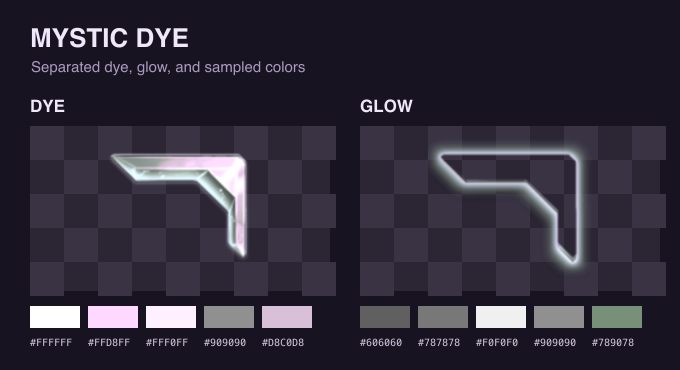
- A Mystic dye first shows Extracting Mystic dye, then the reply with the dye split from its glow, the same picture as the Dye Extractor. If the picture can't be made, the IDs still come through with a note.
agetid has a three second cooldown.
#When it doesn't work
| Keqing says | Why |
|---|---|
| Reply to a Karuta message | agetid was sent without replying to anything |
| Nothing to look up | The reply isn't on Card Details, Dye Details or a Character Lookup |
| No Koibito | The character has no Koibito yet |
| Message unavailable | Keqing couldn't read the message. It needs Read Message History |
| Get ID is off here | The server switched Get ID off in this channel |
#Turning it off in a channel
Open the dashboard, pick your server and go to Feature restrictions, then choose the channels under Get ID & Alias and save. Both agetid and 🔎 stop working there.