Morph Tester
Frame tester with (fake) morph features.
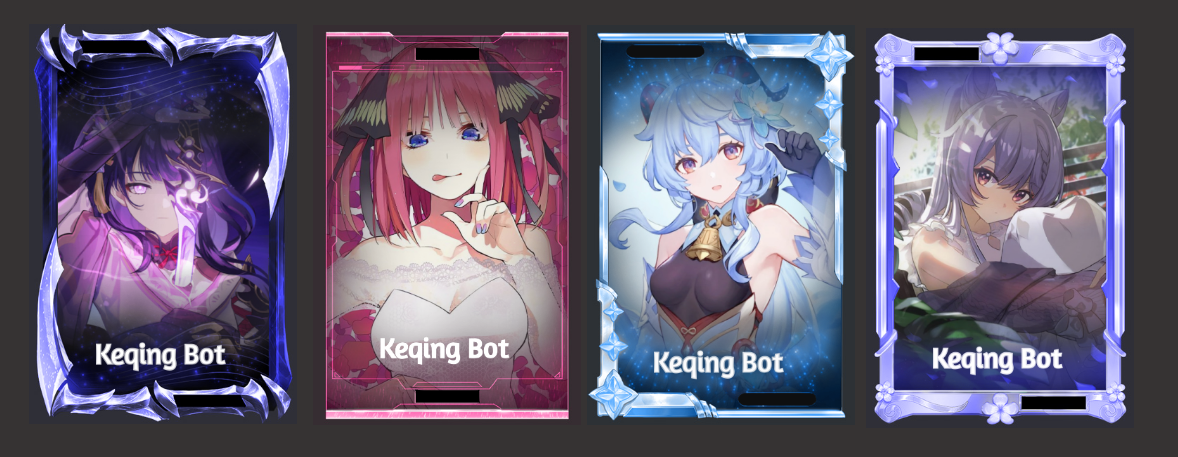
We also provide another feature: Morph testing! This feature is still in beta phase, so it's free for everyone to use. At the moment, it cannot test any cards that you own; it can only test one color for the morph (aside from white). Character names are hidden since inaccurate colors are shown otherwise. The usage of this feature is similar to frame testing, with an additional parameter: the hex code for the morph color.
Info
Non-premium servers can only use test with 1 type only (HUE), upgrade to premium version to be able to test for 6 types
How to use
- 1
Search for the character through `k!lookup`
Example:
k!lookup sinon - 2
Select the corresponding edition
Click the ⬅️ or ➡️ to switch edition
- 3
React with 🖌️.
For non-premium servers, you need to add the 🖌️ (
:paintbrush:) manually. - 4
Specify Frame and Color
- You can use
aframesto Explore Frames in Keqing. - Example:
Broken Mirror #ff0000
- You can use
- 5
Additional feature
You can choose the Morph Type (Premium only)

- 6
Finalize Your Morph

Note
- Non-premium servers can only test using
Huetype - What are morph types? It's the Blending type. Just experiment with it for now since we're still not sure which one is used by Karuta
Color picker
Hex Code:
#ff0000