Drop Analysis
Every card in a drop, and how many people want it.
Reads every Karuta dropPremium
Keqing reads each Karuta drop and replies with the wishlist count of every card, before anyone grabs. It can also ping your wishlist role and star the big ones.
KarutaAPPToday at 16:08
is dropping 4 cards!
This drop has expired and the cards can no longer be grabbed.
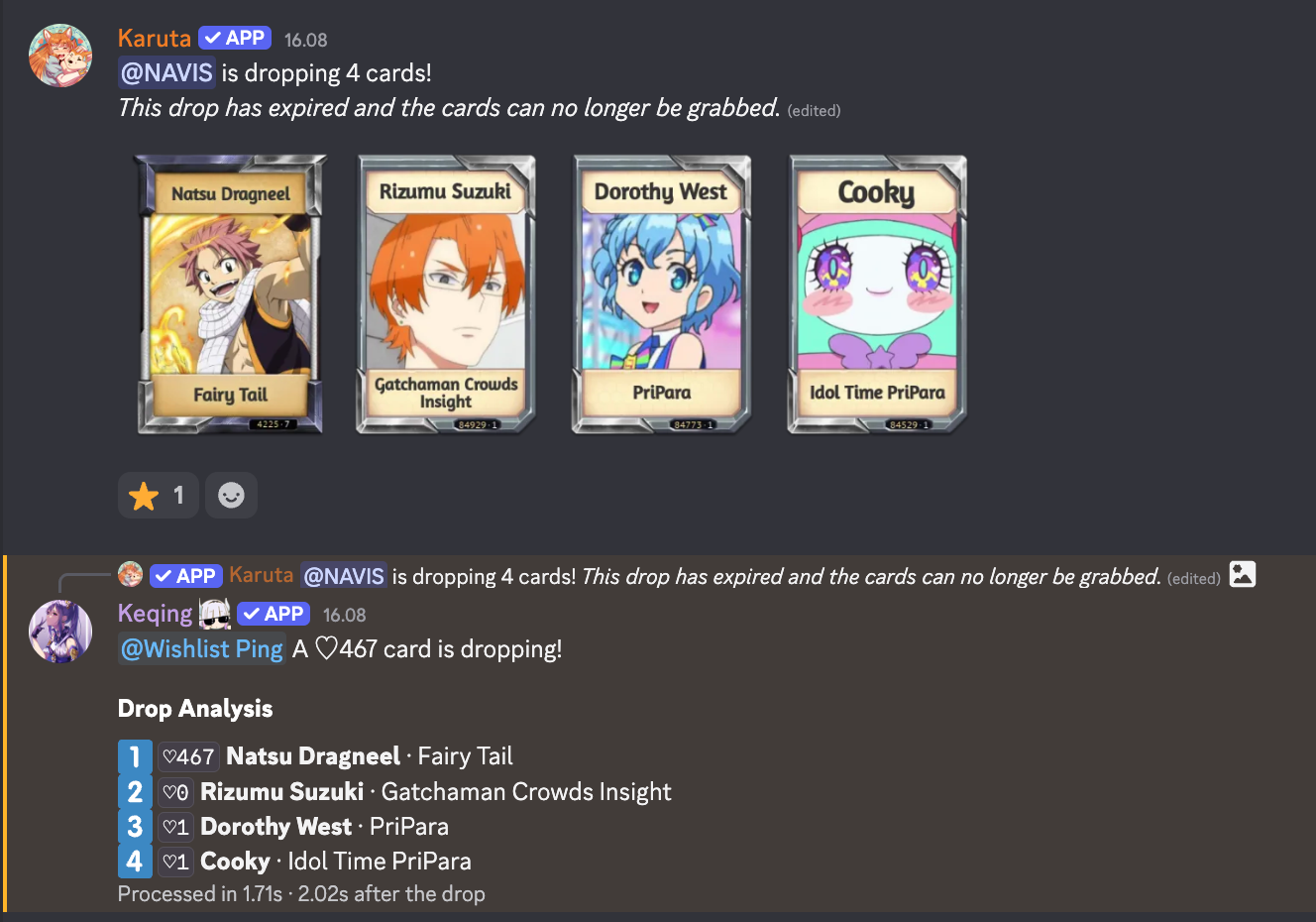
KeqingAPPToday at 16:08
@Wishlist Ping A ♡467 card is dropping!
Drop Analysis
- 1
♡467Natsu Dragneel · Fairy Tail - 2
♡0Rizumu Suzuki · Gatchaman Crowds Insight - 3
♡1Dorothy West · PriPara - 4
♡1Cooky · Idol Time PriPara
Processed in 1.71s · 2.02s after the drop
Each line starts with the same keycap as Karuta's grab button, so 1️⃣ is the card under 1️⃣. It reads personal drops and server drops, including a drop whose picture Karuta adds a moment later, and answers each drop once.
#Turning it on
It's premium, and stays off until an admin opts in. Switch on Read Karuta drops on the Drop analysis page of the dashboard, or run adropwlsettings on. Both need Manage Server.
If the server's premium ends, drop reading switches off and has to be turned on again after renewing.
#Settings
Run adropwlsettings alone to open a panel: a Replies menu, switches for drop reading, the ping and auto-star, and a Change a minimum menu. Only the admin who opened it can use it, and it closes after two idle minutes. The panel also warns you when a setting can't work yet, such as auto-star with no starboard channel.
youToday at 21:04
adropwlsettings
KeqingAPPToday at 21:04
Drop analysis
How Keqing answers Karuta drops in Your server.
- Drop reading
- On
- Replies
- Every drop, every card
- Wishlist ping
- On, at ♡250
- Auto-star
- On, at ♡250
- Starboard
- #starboard
- Wishlist role
- @Wishlist Ping
Interactive preview · Changes stay in this demo
Example drop · current settings
@Wishlist Ping A ♡467 card is dropping!
Drop Analysis
- 1
♡467Natsu Dragneel · Fairy Tail - 2
♡0Rizumu Suzuki · Gatchaman Crowds Insight - 3
♡1Dorothy West · PriPara - 4
♡1Cooky · Idol Time PriPara
Processed in 1.71s · 2.02s after the drop
⭐ Auto-starred to #starboard · Natsu Dragneel · ♡467
Automatic reading starts off until an admin enables it. Auto-star needs a starboard channel; pings need the wishwatch role and active wishlist alerts. Silent mode keeps pings and auto-star running.
| Setting | Command | Default |
|---|---|---|
| Drop reading | adropwlsettings on / off | Off |
| Replies | adropwlsettings reply all / highlight 250 / silent | All, at ♡100 |
| Wishlist ping | adropwlsettings ping 300 / off | Off, at ♡100 |
| Auto-star | adropwlsettings autostar 500 / off | Off, at ♡100 |
A number turns an option on with that minimum. Minimums run from 1 to 1,000,000, and 250, 1,500 or 1.5k all work. adws is a shorter name for the command.
#How much it says
| Reply | Keqing answers |
|---|---|
| All | Every drop, every card, with how long it took |
| Highlight | Only drops with a card at the minimum, listing just those cards |
| Silent | Never. Pings and auto-star still work |
#Pings and stars
- Wishlist ping pings the @Wishlist Ping role on the same reply when a card reaches the minimum, listing just those cards. It's sent even in Silent. Pausing Wish Watch pauses it too, and nothing is pinged until someone has joined the role with
awishwatch. - Auto-star posts the drop to your starboard when a card reaches the minimum, with a Highlight field naming the cards that earned it. It skips the Star role requirement and needs a starboard channel.
#Reading one drop
Reply to a Karuta drop with adropwl, or to a drop image someone uploaded at its original size. This works even with automatic reading off. adroplist works too.
KarutaAPPToday at 21:03
is dropping 4 cards!
This drop has expired and the cards can no longer be grabbed.
youToday at 21:04
↳ Replying to Karuta's drop
adropwl
KeqingAPPToday at 21:04
Drop Analysis
- 1
♡467Natsu Dragneel · Fairy Tail - 2
♡0Rizumu Suzuki · Gatchaman Crowds Insight - 3
♡1Dorothy West · PriPara - 4
♡1Cooky · Idol Time PriPara
Processed in 1.71s · 2.02s after the drop
#When Keqing isn't sure
A card Keqing can't match exactly shows the closest card it found, with how close the reading was, such as ≈86%. Below 60% it shows ♡? instead of a count.
Neither kind ever counts toward Highlight, a ping or a star. Every unsure card is sent to Keqing's team, who check it so the next reading of that card is exact.